
Description
The Approval view provides a streamlined interface for reviewing and approving promotions submitted by your team. Managers and approvers can efficiently control the approval workflow using drag-and-drop actions or bulk selections.
Navigation
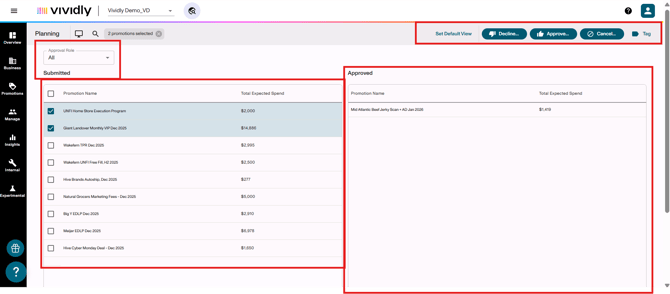
-
Approval Role dropdown: Same as Submission view - filter by approval role.
-
Submitted list: Left side of screen showing promotions in "Submitted" status awaiting approval.
-
Approved list: Right side of screen showing promotions that have been approved.
-
“Decline” button: Button that allows to decline checked/selected promotions.
-
“Approved” button: Button that allows to approve checked/selected promotions.
-
“Cancel” button: Button that allows you to cancel checked/selected promotions.
-
“Tag” button: Button that allows you to add a tag to selected promotions.