
Description
The Calendar view is the simplest of all the "Planning" views. It's a visual promotional calendar interface that displays promotions by month or year with color-coded status indicators, filterable by customer/product/promotion type, and exportable as PDF/PNG.
Fields
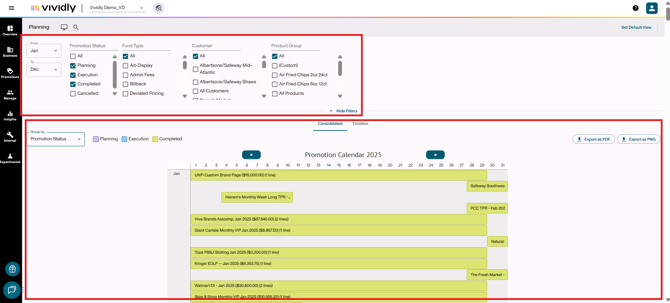
- Filters panel section: Section where you’ll find a set of elements to filter viewable promotions in the calendar view.
-
- “Show/Hide Filters” button: Controls visibility of filtering options to reduce visual clutter when not needed. Show Filters: Expands filter panel (filters currently hidden) and Hide Filters: Collapses filter panel (filters currently visible).
-
-
- “From and To” dropdowns: Date range selectors to filter promotions by specific time period. Narrows calendar view to show only promotions within selected date range
-
-
-
- Promotion status list: Multi-select checkbox list of promotion statuses. It allows to filter the calendar to show only promotions in selected status(es).
-
-
-
- Fund type list: Multi-select checkbox list of promotion fund types. It filters the calendar to show only specific promotion types.
-
-
-
- Customer list: Multi-select searchable list of all customers. This filters the calendar to show only promotions for selected customer(s).
-
-
-
- Product Group list: Multi-select list of product groups. It filters the calendar to show only promotions featuring selected product group(s).
-
- Calendar section: Section where the promotions are displayed according to the selected filters in a calendar view.
-
- Consolidated tab: Tab selector for traditional month-by-month calendar view in a vertical orientation. It displays promotions as colored blocks in monthly grid format.
-
- Timeline tab: Tab selector for year-long horizontal timeline view. It shows an entire year of promotions organized by customers as horizontal bars.
-
- “Group by” dropdown: Selector to change color-coding scheme according to the customer type or the promotion status.
-
- Calendar section: Main visual display area showing promotions as colored blocks/bars.
-
- “Year change” arrows: Left/right arrow buttons to navigate between years.
-
- “Export as PDF” button: Button to download calendar as PDF file.
- “Export as PNG” button: Button to download calendar as PNG image file.