
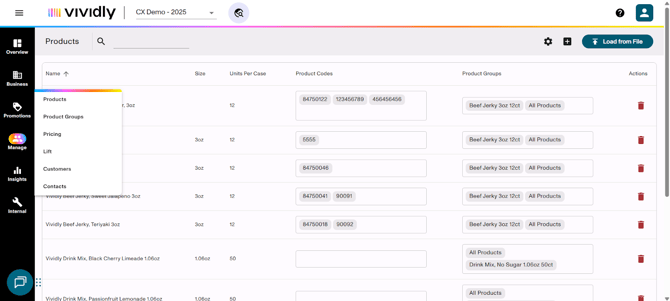
The Manage section of Vividly that serves as a central hub to manage foundational elements that drive promotions, forecasting and deduction processing. This section subdivides in several pages:
- Products: Database of all products offered by the brand with detailed specifications, codes, and identifiers used throughout the system.
- Customers: Customer database containing account information, sales assignments, forecasting parameters, and various customer codes for system integration.
- Product Groups: Organizational structure for products made with groups that allow products to share details like pricing, promotion planning, and reporting. When Product Hierarchy is enabled, this section will be replaced with a Product Hierarchy section.
- Hierarchies: Customizable multi-level structure that organizes your customers and products from broad groupings down to the most granular level — for example, Company → Division → Banner → Store for customers, or Brand → Category → SKU for products. It replaces flat customer/product group lists with a structured parent-child model, ensuring each customer or product rolls up cleanly through every tier. This foundation enables more accurate planning, reporting, and analytics by allowing users to view and act on data at any level of the organization's commercial structure
- Customer Hierarchy: Organize customer master data into a customizable multi-level structure — e.g., Company → Division → Region → Banner → Store. Each tier is built using customer groups (higher levels) and individual customers and groups must have unique names across the entire hierarchy.
- Product Hierarchy: Organize product master data into a customizable multi-level structure (e.g., Business Unit → Brand → Category → Sub-Category) down to individual SKUs. Like Customer Hierarchy, it uses product groups as parent nodes and products as child-level items; a product can only belong to one child-level product group.
- Contacts: Optional contact management system for storing broker and third-party contact information that can be associated with promotions.
- Pricing: Page for centralized management of unit-level pricing by customer and product group with date tracking and bulk update capabilities.
- Lift: Automated lift percentage population system that pre-fills expected incremental volume increases for promotions based on customer, product group, and promotion type combinations.
Note: Click on each of the sections to be redirected to an article that describes in detail its functionalities, fields and best practices.