
| Table of contents: |
| Keywords. |
| Description. |
| List of fields. |
| Lift table search and settings options. |
| Lift table action buttons. |
| Lift editor fields. |
| Step-by-step guides. |
| Best practices. |
Keywords.
-
Sales Lift: Incremental sales volume above baseline during promotions.
-
Baseline Sales: Expected sales volume without promotional activity.
-
Lift Percentage: Proportional increase in sales due to promotion.
-
Promotional Effectiveness: Measure of promotion success based on lift metrics.
-
Historical Lift: Past performance data for similar promotional activities.
-
Lift bucket: A grouping of promotion types that share similar lift characteristics, allowing you to manage lift percentages more efficiently by applying the same lift values to multiple promotion types at once.
Description.
The Lift page provides an automated system to pre-populate lift percentages (expected incremental volume increases) in promotions based on customer and product group combinations.
List of Fields.
Lift table search and settings options:
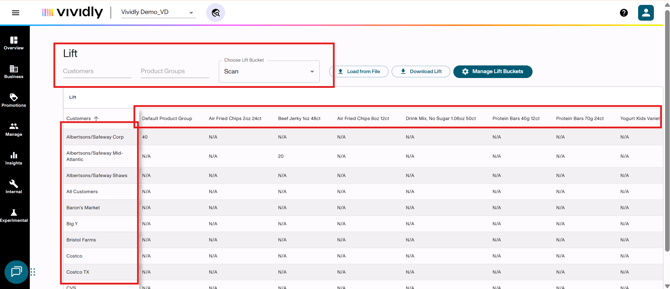
Set of search options used to filter lift data.
-
Customer search textbox: Filters lift table to display only selected customer(s) and their associated lift percentages.
-
Product groups search textbox: Filters lift table to show only selected product group(s) and their lift percentages across customers.
-
Lift Bucket dropdown: Filters lift table to show only lift entries associated with specific lift bucket (promotion type grouping).
-
Lift table: Matrix display showing lift percentages for each customer-product group-lift bucket combination.
-
Customer column: Lists all customers in the system; rows in the lift table matrix.
-
Product group row: Lists all product groups with "Use for Pricing" toggle ON; columns in the lift table matrix.
Lift table action buttons:
-
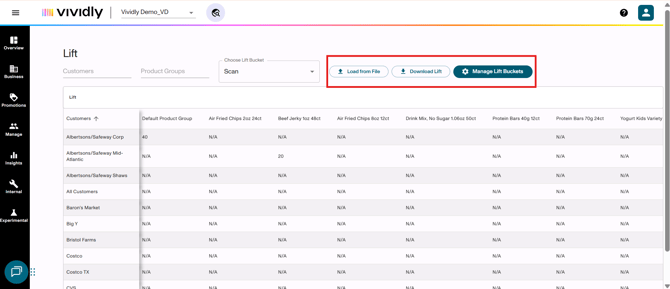
Load from File button: Bulk upload tool for adding or updating multiple lift entries simultaneously via Excel file.
-
Download Lift: Exports all lift data to Excel/CSV format for external management or bulk editing preparation.
-
Manage Lift Buckets: Opens interface for creating and managing lift bucket groupings of promotion types.
-
-
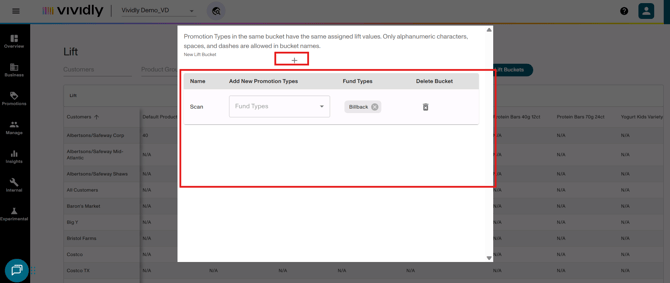
Name column: Displays the name of the lift bucket, which is the grouping identifier for promotion types that share similar lift characteristics.
-
-
-
Add new promotion types column: Dropdown menu that allows you to assign promotion types to the lift bucket, grouping them together for lift management.
-
-
-
Fund types column: Displays which promotion types (fund types) are currently assigned to the lift bucket.
-
-
-
Delete bucket: Removes the lift bucket grouping from the system.
-
Add bucket icon (“+”): Creates new lift bucket grouping.
-
Lift editor fields:
-
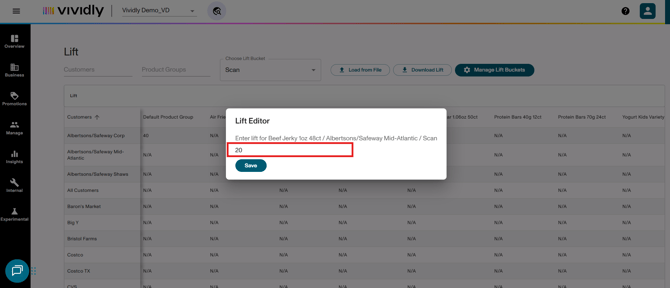
Lift percentage textbox: Input field for entering the expected incremental lift percentage for a specific customer-product group-lift bucket combination.
Step-by-step Guides (Coming Soon)
In the lift table, there’s some actions that can be done in order to manage your lift pre-set values. First, you need to access this page which you can do through “Manage” > “Lift”. Once in, you can do the following:
-
How to filter lift data using customer, product group and lift bucket criteria
-
How to add a single lift percentage manually
-
How to bulk upload lift percentages from a file
-
How to edit a single lift entry
-
How to bulk update lift from a file
-
How to delete a lift entry
-
How to create a lift bucket
-
How to delete a lift bucket
-
How to export Lift data
Best Practices
-
Use lift buckets strategically; grouping promotion types with similar lift characteristics
-
Update lift based on actuals
-
Use bulk upload for efficiency
-
Review lift table quarterly to make sure everything is set up correctly
- Lift directly impacts velocity calculations in the forecast. Since Total Units = Stores × Velocity × Seasonality × (1 + Expected Lift), inaccurate lift values will distort your baseline forecast and future projections.
- When POS data reveals actual lift performance, update your lift table and promotion expected lift accordingly. This creates a continuous improvement cycle that enhances forecast accuracy over time.
- You can group similar promotion types (e.g., all temporary price reductions) rather than setting individual lift for every single fund type. This balances efficiency with accuracy.
- While lift is not mandatory, using it is best practice for driving forecast incrementality. For promotions that don't drive true incrementality (e.g., duplicate accounting scenarios), you can skip lift and use total expected unit sales instead.