
What This Covers?
This article walks through the full dispute and recovery workflow: confirming a deduction is invalid, building your documentation package, tracking it in Vividly's Miss Log, submitting externally, and closing the dispute in Vividly. The flagging step itself is covered in the Flag Invoice Lines for Sales Review or Dispute article.
Vividly also offers dispute management services that can handle disputes on your behalf. Contact your Customer Success Manager or email support@govividly.com to learn more about Vividly Dispute Services and how to add them to your subscription.
Where To Find the Tools Needed for this Process?

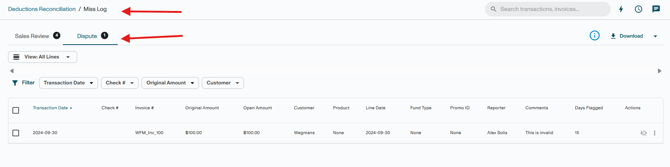
All disputed invoice lines are tracked in the Miss Log. Navigate to Business → Deductions Reconciliation → View Miss Log hyperlink, then select the Dispute tab.
What Can (and Cannot) Be Disputed?
Not all deduction types are eligible for dispute. Before flagging, confirm the deduction is truly invalid and not supported by a contract, promotion, or agreed-upon business term.
Post audits, intro allowances, and freight allowances should generally be routed to Sales Review instead of Dispute. Additionally, avoid disputing items outside the retailer/distributor dispute window, as they are unlikely to be recovered.
Steps to Dispute and Recover Invalid Deductions
1. Confirm the Deduction is Invalid
Follow your company’s dispute guidelines and supporting documentation. Review any relevant materials, including:
- Contracts or agreements
- Promotion calendars
- Agreed-upon business terms
- Bill of Ladings (BOLs)
- Backup documentation
- Prior approvals or communication records
2. Flag the Invoice line for Dispute in Vividly
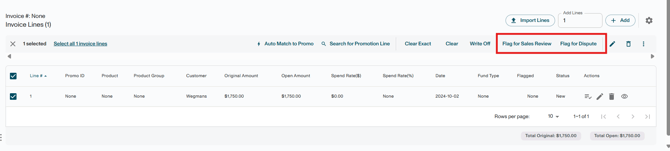
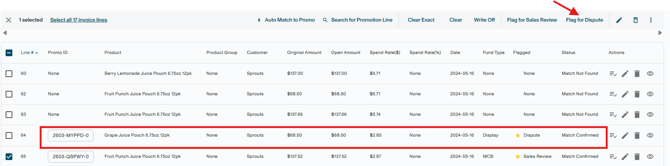
Follow the steps in the Flag Invoice Lines for Sales Review or Dispute article. Add detailed comments explaining why the deduction is invalid — the more context provided, the stronger the case for the reviewing team.
3. Build your Documentation Package
Gather all documents that support your claim. A complete package typically includes:
-
Bill of Lading (BOL) — proof of shipment and delivery terms.
-
Invoice — confirms the invoiced amount and applicable terms.
-
Purchase Order (PO) — validates the agreed-upon pricing and conditions.
-
Proof of Delivery (POD) — confirms goods were received as specified.
-
Any relevant email correspondence, contracts, or compliance records.
Warning: Carriers typically retain proof-of-delivery records for only 90 days. Retrieve and store BOLs and PODs as soon as a deduction is identified — do not wait until the dispute is formally submitted.
4. Track the Dispute in the Miss Log
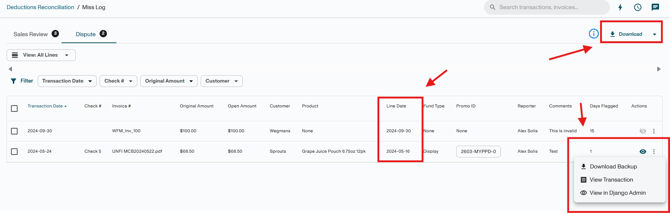
The flagged invoice line appear in the Dispute tab of the Miss Log. From here you can:
-
View the backup file linked to the invoice for reference.
-
Export the dispute list to Excel for team tracking or management reporting.
-
Monitor items approaching their retailer dispute deadline and escalate as needed.
5. Submit the Dispute Externally
Submit your challenge to the retailer/distributor using their established process — retailer/distributor portal, AP team contact, or email. Every submission should include:
-
A clear explanation of why the deduction is invalid, supported by facts.
-
All supporting documents from Step 3, and any other item reqired by the retailer/distributor.
-
The invoice number and deduction reference number for tracking purposes.
Follow up regularly. If there is no response after approximately 30 days, escalate to the retailer/distributor's Accounts Payable team or your account manager.
6. Close the Dispute in Vividly
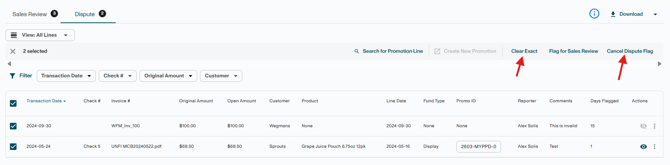
Once the outcome is confirmed, the dispute must be closed in Vividly:
1. If the dispute is won — If a repayment is issued, offset the original deduction against the repayment.
Click here to review how to resolve repayments and process offsets.
2. If the dispute is lost — If the retailer or distributor confirms the deduction is valid and no repayment will be issued, resolve the disputed line by writing it off to the appropriate GL account or matching it to a promotion if applicable.
- Check the checkbox next to the disputed invoice line.
- Click Write Off.
- Select the appropriate Write Off Fund Type from the dropdown (for example: Shortage, Other, Terms Discount, Admin Fees, etc.).
- Enter a required comment explaining the write-off decision.
- Click Submit → Confirm
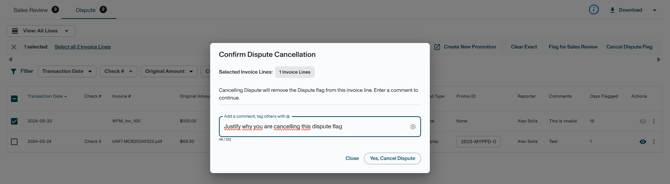
Note: Closing a dispute flag in Vividly requires action from your assigned dispute team. Do not cancel the dispute flag yourself until the dispute outcome has been officially confirmed.
Some companies choose to clear disputed deductions to a dedicated dispute GL account or directly to the appropriate expense account in the ERP while the dispute is being worked. This approach can create a cleaner accounting process because the dispute does not remain open on the balance sheet. If the dispute is lost, no reclassification is needed, and if the dispute is won, the repayment simply offsets the amount already recorded in the expense account.
Potential Problems and Process Resolution
Problem: The Dispute Window Expired Before Submission

Likely cause: The deduction was not flagged or prioritized in time.
Fix: Flag disputes as soon as invalidity is confirmed. Use the Line Date filter in the Miss Log or the Date Filter in the Deductions Dashboard to catch at-risk items earlier and avoid missed windows.
Problem: The Backup Needed for the Dispute is not Attached to the Invoice
Likely cause: Backup was not uploaded at the time of invoicing.
Fix: Check the following to look for the file or identify transactions and invoice lines with Backup Attached:
-
File Manager (Backup Files tab)
-
Backup Attached filter (Deduction Reconciliation → Backup Attached filter)
-
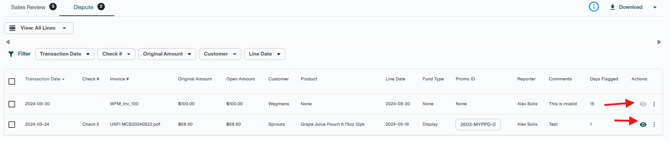
Eye icon in invoice lines (Deduction Reconciliation → View Miss Log → Actions column)
If unavailable, request a copy from the retailer or carrier — noting that carrier retention is typically 90 days for PODs.
Problem: The Dispute was Denied by the Retailer
Likely cause: Insufficient documentation, missed deadline, or a valid deduction was incorrectly flagged.
Fix: Review the denial reason. If documentation was incomplete, supplement and re-submit if the retailer allows it. Escalate to sales or account management if needed. If the deduction is valid, clear it to the appropriate promotion or GL.
Key Terms
-
Invalid Deduction — A deduction taken by a retailer that is not supported by a contract, promotion, or agreed-upon term.
-
Dispute — The formal process of challenging an invalid deduction directly with the retailer.
-
Miss Log — Vividly's centralized view of all invoice lines flagged for Sales Review or Dispute.
-
Cancel Dispute — The action in Vividly that closes a dispute flag and returns the invoice line to "Match Not Found" status for resolution.
-
BOL (Bill of Lading) — A shipping document that serves as proof of shipment terms and delivery.
-
POD (Proof of Delivery) — A document confirming that goods were received as specified by the purchase order.
-
Dispute Window — The period of time a retailer allows for a supplier to formally challenge a deduction. Varies by retailer.