
What is Duration Based Planning?
- Duration based promotions are created to spread spend evenly across multiple months (the duration) instead of needing to create individual promotions for each month of a longer promotion
-
If you prefer to continue adding promotions month-by-month, there are no changes as this is an optional feature with an updated, redesigned planning experience
-
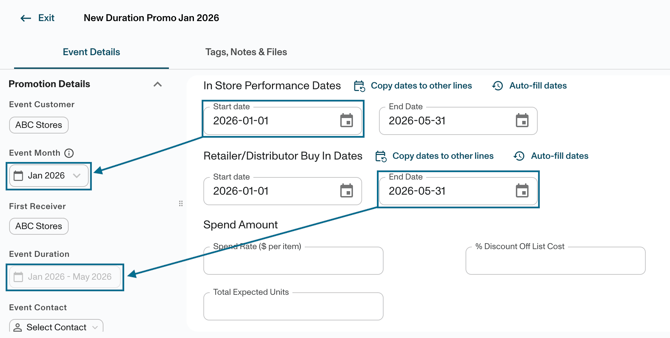
- Month + Year should be filled in for when the promotion is running but refers to the start month of the duration. Ending dates will be automatically populated based on the selected promotion timeframe
-
- Promotion Name should still include: Customer Name Product (or Product Group) Promotion Type Month (abbreviated to first 3 letters) Year
- Ex: Target Snacks Scan Sep 2026 or Kroger EDLP Dec 2026
- The month refers to the Start month of the duration
- Event duration end month will be dictated by dates in line details
- Promotion Name should still include: Customer Name Product (or Product Group) Promotion Type Month (abbreviated to first 3 letters) Year
- First Receivers will be automatically applied across the entire duration. If there is a need for different First Receivers in different months, you will still need to create separate promotions for each First Receiver and their respective Duration
- Creating a duration-based promotion allows for fewer promotions to be created and will allow deductions to be matched to a single, longer duration promotion instead of having the need for multiple single-month promotions
Uploading Duration-Based Promotions
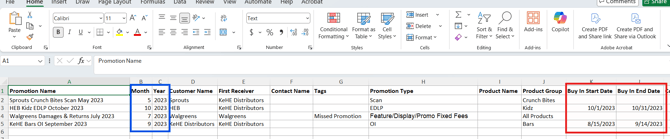
Uploading promotions in bulk works the same as before. Make sure your file includes:
-
Month/Year (Blue) will refer to the start month of the promotion
-
Event Duration (Red) will be dictated by the earliest date (Buy In, In Store, Scan Back) which matches the Month/Year, and the latest date which will inform the length of the duration and be the ending month shown in Promotion Details once created
Transitioning From Monthly To Duration-Based Promotions
Existing promotions will not change. There is no automatic way to merge past monthly promotions into a single duration-based one.
If you want to start using duration-based planning, you can either:
-
Keep past promotions as-is and use duration for new promotions going forward
- Edit individual promotions within your portal to account for longer durations; this will only be applicable if deductions have not been matched as there is a risk of additional deductions remaining open
-
Download your existing promotions, update them with start and end dates, and re-upload
- This will require careful consideration and is not recommended as any deductions that have been matched to the promotion will still only apply to the original timeframe, and the additional months' promotions will need to be cancelled so that spend and analytics will not be duplicative
The easiest approach is to start with a time period that has not yet had promotions planned.